The Complete Guide to Google Business Profile: How to Set Up, Optimize, and Dominate Local Search in 2025
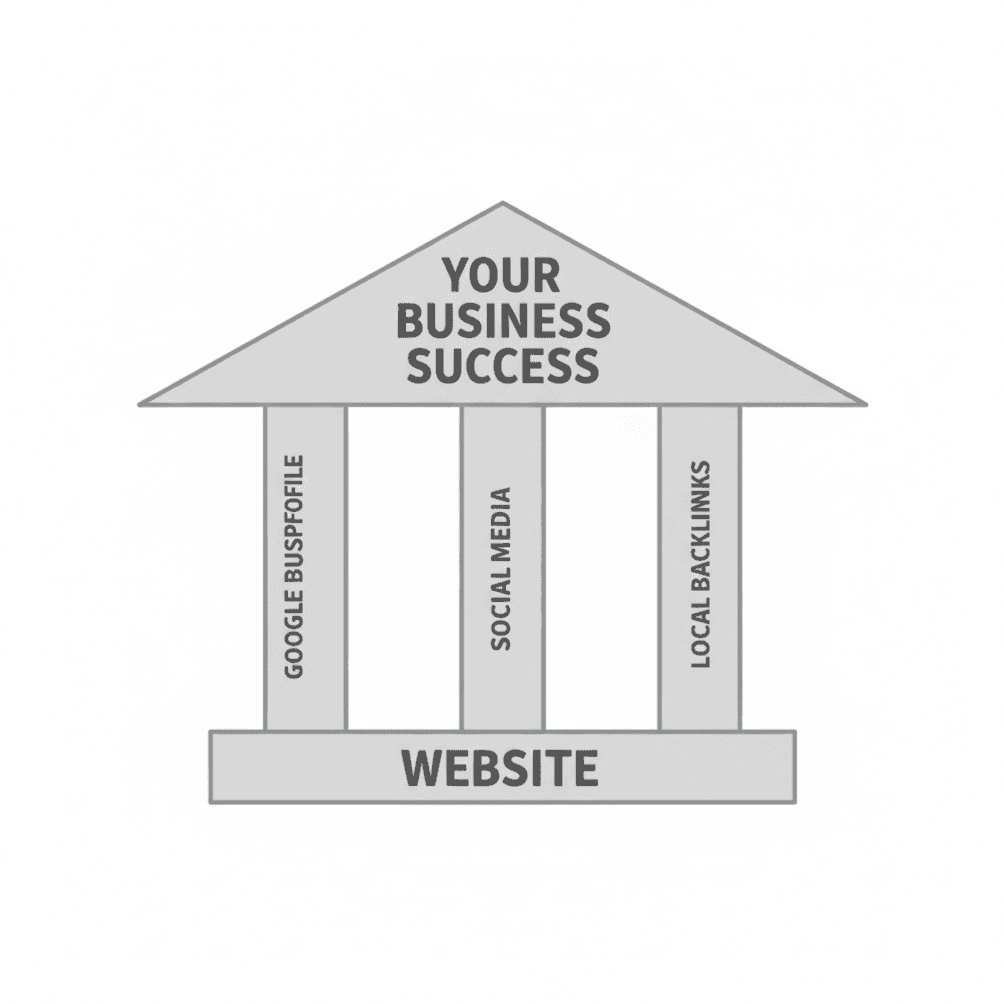
Your website is the foundation of your online presence, but it's only one piece of a larger structure. As we covered in The 3 Pillars Every Service Business Needs to Get Found Online, your Google Business Profile (GBP) works hand in hand with your website, social media presence, and backlinks to create a complete system that helps customers find you, trust you, and ultimately choose you.
This guide goes deep on that first pillar—your Google Business Profile—and walks you through everything you need to set it up the right way, optimize it for maximum visibility, and maintain it so your phone keeps ringing.
Why Google Business Profile Matters for Service Businesses
If you're a plumber, HVAC technician, landscaper, or any other home service provider, your Google Business Profile isn't just a nice-to-have—it's one of the most powerful tools you have for attracting local customers. It's what shows up when someone Googles your business name, searches for services in your area, or asks Google Maps for a recommendation.
And here's the kicker: unlike paid advertising, your GBP is completely free. Google gives you the platform. You just need to set it up well and keep it current.
The Numbers Don't Lie
Nearly half of all Google searches—46%—carry local intent, meaning people are actively looking for businesses in their area. When someone types "emergency plumber near me" at 10 PM with a burst pipe, Google's Local Pack (the map with three businesses at the top of search results) is the first place they look.
Businesses with complete, verified Google Business Profiles receive 80% more appearances in search results and are 2.7 times more likely to be considered trustworthy by potential customers. A verified profile generates roughly 200 clicks or interactions per month on average, with about 105 of those leading directly to the business's website.
For service businesses, here's the piece that really matters: 76% of people who search for something nearby on their smartphone visit a related business within a day. And 88% of consumers who do a local search on their phone visit or call a business within 24 hours.
This is why GBP signals account for approximately 32% of local pack ranking factors—the single largest share among all ranking factors for local search.
What Happens Without a Google Business Profile
You're invisible in the Local Pack—the map results where most local clicks happen. When a customer searches for your business by name, they see a sparse, unverified listing that doesn't inspire confidence. You lose control of your business information. Without a claimed profile, Google pulls data from wherever it can find it—which might be inaccurate.
Your GBP Is Your Digital Storefront
Think of your Google Business Profile the way you'd think about a physical storefront. Your profile photo is your sign. Your business description is your window display. Your reviews are word-of-mouth happening in real time. And your contact information is the welcome mat.
When someone finds you on Google, your GBP is often the very first impression they get. Make it count.
How to Set Up Your Google Business Profile: A Step-by-Step Guide
Setting up your GBP correctly from the start prevents headaches down the road and gives you the best chance of ranking in local search results.
Step 1: Create or Claim Your Profile
Start with a Business Google Account
Don't use your personal Gmail account for this. Create a dedicated Google account for your business using your business email address (you@yourcompany.com). This keeps things professional and makes it much easier to grant access to employees or marketing partners down the road without sharing personal account credentials.
Check If Your Business Already Exists
Head over to google.com/business and search for your company name. If a listing already exists (which happens more often than you'd think—Google often creates them automatically), you'll want to claim it rather than create a duplicate. Duplicate listings cause all kinds of ranking confusion.
If No Listing Exists
Click "Add your business to Google" and follow the step-by-step prompts. You'll enter your business name, category, and location details.
Step 2: Enter Your Business Information
Enter your business name exactly as it appears on your signage, website, and business cards. It should match your official business name—don't try adding keywords like "Best Plumber Kansas City" to your business name. That violates Google's guidelines and can get your profile suspended.
Business Type
Google will ask how customers interact with your business. For service businesses, you'll typically select:
"I deliver goods and services to my customers" (for service-area businesses like plumbers, landscapers, etc.)
"Customers visit my business" (if you have a physical location customers come to)
You can select both if it applies to your situation.
Service Area vs. Physical Address
For service-area businesses (the ones that travel to customers), you'll specify the areas you serve rather than displaying a physical address. Be realistic here—Google recommends a maximum 2-hour driving radius. Listing every city within 50 miles can raise red flags and may cause issues with verification.
If you do serve customers at a physical location, enter your complete address including suite numbers. Make sure it matches what's on your website, business cards, and other directories exactly.
Step 3: Add Contact Information
Add your primary business phone number and website URL. This phone number will be publicly visible, so use your main business line—not a personal cell phone.
Pro tip: Use UTM codes on your website URL to track visits from your Google Business Profile in Google Analytics. This helps you understand how much traffic your GBP is actually driving.
Step 4: Verify Your Business
Verification is required before your profile goes live. Google needs to confirm you're a real business at a real location.
Common verification methods:
Phone or text verification (most common for service businesses)
Video verification (Google may ask you to record a video showing your business location, equipment, or branded materials)
Postcard verification (a physical postcard with a verification code is mailed to your address—takes 5-14 days)
Important: Don't change your business name or address during the verification process. Any changes can restart the verification from scratch.
What if verification fails?
If your standard verification attempt doesn't go through:
Try a different verification method
Make sure your business information matches what's on your website and other listings
Contact Google Business Profile support directly
Be patient—some verifications take up to two weeks
How to Optimize Your Google Business Profile for Maximum Visibility
A verified profile is just the starting point. Optimization is what separates businesses that show up on the first page from those buried where nobody looks.
Complete Every Section
The single most important factor for local ranking is having a complete profile. Businesses in the top three positions of search results have filled out 75% more profile fields than their lower-ranking competitors.
Business Description
You have 750 characters to describe your business. Use them wisely:
Start with your main service and location ("Family-owned plumbing company serving Johnson County since 2005")
List your primary services
Mention what sets you apart (24/7 emergency service, licensed and insured, satisfaction guarantee)
Include relevant keywords naturally—don't stuff
Write in a conversational tone. With Google's AI now pulling from your profile to generate answers for voice and AI-powered searches, natural language in your description helps your business appear in these newer search formats.
Services
Add every service you offer. For each one, include a description (up to 300 characters) and pricing if possible. This helps Google match you with specific searches. A plumber who lists "slab leak repair" as a service is more likely to appear when someone searches "slab leak repair near me."
Attributes
Attributes are specific characteristics about your business—payment options accepted, accessibility features, service options, and identity attributes (veteran-owned, woman-owned, etc.).
Select every attribute that honestly applies to your business. These help you show up in filtered searches ("24-hour plumber" or "plumber that accepts credit cards") and build trust with customers who value those qualities.
Choose the Right Categories
Your primary category is the single most important ranking factor for the Local Pack. Pick the most specific category that describes your main business activity.
Examples:
Choose "Plumber" not "Home Improvement"
Choose "Landscape Designer" not "Contractor"
Choose "HVAC Contractor" not "Home Services"
You can add up to nine secondary categories, but only add ones that genuinely describe services you offer. Adding irrelevant categories dilutes your ranking signals.
Add High-Quality Photos and Videos
Businesses with photos receive 42% more requests for driving directions and 35% more click-throughs to their website. Visual content matters—a lot.
Essential photos to include:
Profile photo (usually your logo)
Cover photo (your best work or your team)
Before-and-after shots of completed projects
Team photos showing your crew at work
Photos of your equipment and branded vehicles
Photo guidelines: Use high-resolution images (at minimum 720x720 pixels). No stock photos—customers can tell, and they hurt trust. Try to upload new photos at least monthly to show Google your profile is active.
Reviews: Your Most Powerful Trust Signal
Reviews are the second most important ranking factor for the Local Pack. The average local business in top Google rankings has around 47 reviews.
How to get more reviews:
Ask every satisfied customer. The best time is right after you've completed a successful job.
Make it ridiculously easy. Send a direct link to your review page (you can generate this from your GBP dashboard).
Follow up. A quick text or email with a review link gets much better results than a verbal ask alone.
How to respond to reviews:
Positive reviews: Thank them specifically. Mention the service you provided and their name. This adds keyword-rich, locally relevant content to your profile.
Negative reviews: Respond professionally and promptly. Acknowledge their concern, apologize if appropriate, and offer to resolve the issue offline. Never argue publicly. Your response isn't just for the reviewer—it's for every future customer reading it.
What NOT to do with reviews:
Never offer incentives for reviews (that violates Google's guidelines)
Don't post fake reviews
Don't ignore negative reviews—silence looks like you don't care
Post Regularly
Google Business Profile posts let you share updates, promotions, events, and news directly on your profile. Posts show both customers and Google that your business is active and engaged.
Types of Posts:
What's New: General updates, behind-the-scenes content, tips
Offers: Promotions with expiration dates ("$50 off furnace tune-up this month")
Events: Open houses, community involvement, seasonal specials
Post Best Practices:
Post weekly—at minimum, 1-2 times per month
Keep text to 80-100 words, front-load the important information
Include high-quality images (1200x900 pixels)
Add a call-to-action button (Call Now, Learn More, Get Offer)
Don't include phone numbers in the post text—use the CTA button instead
AI and Voice Search Optimization
With AI assistants like ChatGPT, Google AI Overviews, and Siri pulling information from business profiles, how you write your GBP content matters more than ever.
Format your business description and service descriptions using complete, conversational sentences that directly answer common customer questions. Instead of just "plumbing repair," write "We provide 24-hour emergency plumbing repair for homeowners in Johnson County, including burst pipes, slab leaks, and water heater replacement."
This kind of natural-language content is exactly what AI systems pull from when generating answers to voice and conversational searches.
Q&A Section
While the traditional Q&A section is being phased out, you can still:
Proactively add and answer common questions yourself
Monitor for questions from the public and respond quickly
Flag inappropriate or inaccurate answers
Think of your entire profile as a FAQ that feeds AI—make sure every answer a customer might need is somewhere in your profile content.
Common GBP Mistakes to Avoid
Keyword Stuffing Your Business Name
Adding "Best Kansas City Emergency Plumber" to your actual business name violates Google's guidelines and can result in your profile getting suspended.
Inconsistent NAP Information
Your Name, Address, and Phone number must match exactly across your website, GBP, and all online directories. Even small differences ("Street" vs. "St.") can confuse Google and hurt your rankings.
Ignoring Reviews
Not responding to reviews—especially negative ones—signals to both Google and potential customers that you're not engaged with your business's reputation.
Using a Shared or Virtual Office Address
Google has cracked down on virtual offices and P.O. boxes. If you're a service-area business, use your actual home address and hide it from the public while displaying your service areas instead.
Choosing Overly Broad Categories
"Contractor" or "Home Services" isn't going to help you rank. Be specific to your actual trade.
Your GBP Is One Pillar—Don't Forget the Others
A fully optimized Google Business Profile will transform your local visibility. But remember: your GBP is one pillar of a three-pillar structure built on your website foundation.
Your website provides the depth—detailed service pages, blog content, contact forms, and the information Google needs to fully understand your business. Your GBP makes you visible in local search and maps. Your social media presence builds community trust and keeps you top of mind. Your backlinks and local citations tell Google you're a legitimate, established business.
When all of these work together, you don't just show up in search—you dominate it.
What to Do This Week
If you don't have a Google Business Profile:
Create a business Google account
Go to google.com/business and create your profile
Complete verification
Fill out every section of your profile
Upload at least 5 photos
If you have a profile but haven't optimized it:
Check that your NAP is consistent with your website
Complete any empty sections
Upload fresh photos
Respond to any unanswered reviews
Write your first GBP post
Ongoing:
Post at least weekly
Upload new photos from completed jobs
Ask every happy customer for a review
Respond to all reviews within 24-48 hours
Update your profile whenever business information changes
This article is part of our series on building a complete online presence for service businesses. Read The 3 Pillars Every Service Business Needs to Get Found Online to understand how your website, GBP, social media, and backlinks work together to grow your business.