The Complete Guide to Social Media for Service Businesses: How to Build Trust and Stay Visible in 2025
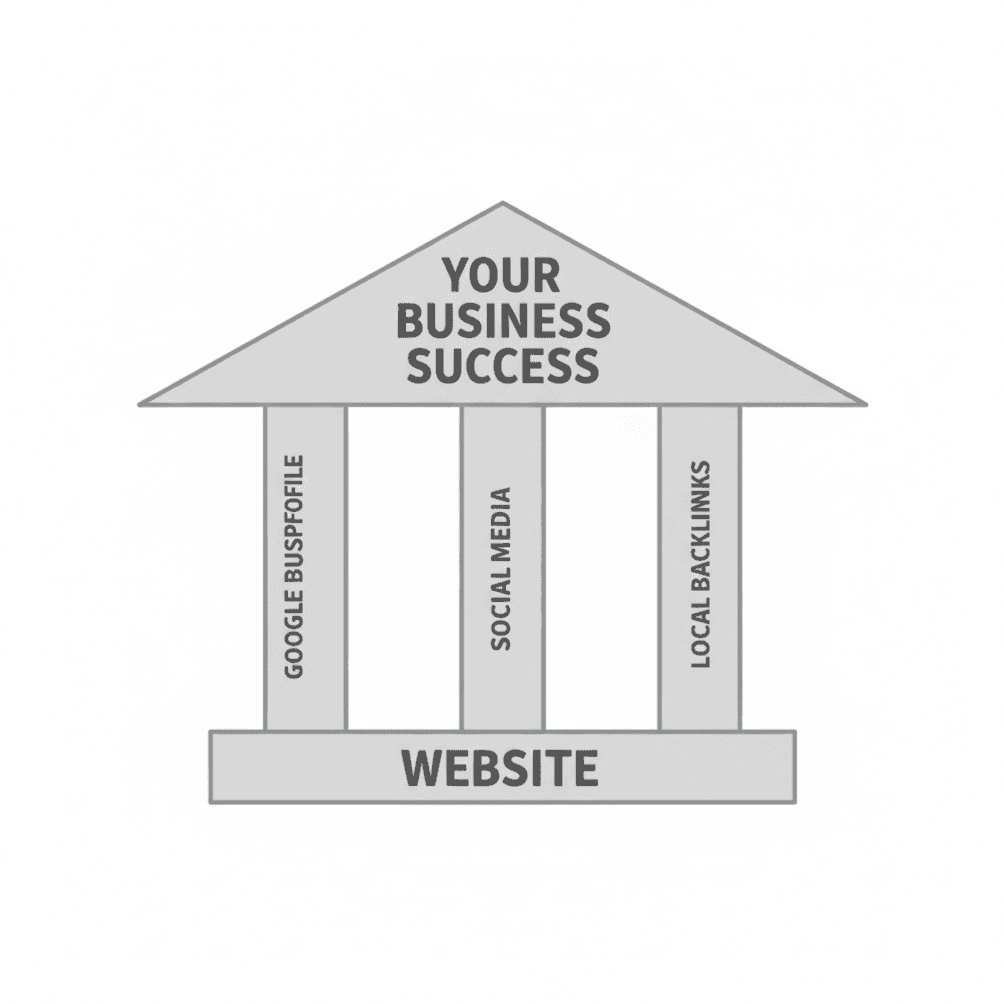
Your website is the foundation of your online presence. Your Google Business Profile makes you visible in local search. But social media? That's where you stay top of mind between jobs and build the kind of trust that turns strangers into paying customers.
As we covered in The 3 Pillars Every Service Business Needs to Get Found Online, social media is one of the three pillars that support your business growth—working alongside your GBP and local backlinks to drive traffic and credibility back to your website.
This guide walks you through why social media matters for service businesses, which platforms are worth your time, what to actually post, and how to make the whole thing work without burning hours every day.
Why Social Media Matters for Service Businesses
Let's clear something up right away: social media for a plumbing company or landscaping crew isn't about going viral. It's not about racking up likes for the sake of likes. It's about being visible to the right people—your local community—so that when they need your service, you're already a name they recognize and trust.
Here's why that matters: 67% of consumers say they're more likely to purchase from a business after interacting with them on social media. And 92% of consumers trust recommendations shared on social media—even ones from people they don't personally know.
When somebody's looking for a plumber, roofer, or landscaper, they often ask friends on Facebook first. If your name comes up—or if they've already been seeing your work pop up in their feed—you're miles ahead of the competition.
What Social Media Actually Does for You
Builds familiarity before they need you. Most people don't need a plumber today. But when they do, they'll remember the one whose before-and-after photos they've been scrolling past for months.
Shows you're active and legitimate. A Facebook page with recent posts tells people you're still in business and actively working. A dead page with posts from 2019? That raises red flags.
Drives traffic to your website. Every social profile is another path that leads back to your site—the place where people can actually contact you, see your services, and request quotes.
Generates reviews and recommendations. Social platforms make it easy for happy customers to publicly recommend you. Those recommendations then get seen by their friends and neighbors.
Supports your local SEO. While social media isn't a direct Google ranking factor, it creates signals Google pays attention to—brand mentions, traffic to your site, and engagement that shows your business is active and relevant.
Which Platforms Should You Focus On?
You don't need to be everywhere. For most service businesses, two platforms will handle the heavy lifting: Facebook and Instagram. A third option—Nextdoor—is worth knowing about, but it's not essential right out of the gate.
Facebook: Your Local Home Base
Facebook is still the most effective social platform for local service businesses. With 2.9 billion monthly active users and strong local features, it's where your customers are—especially if you serve homeowners over 30.
Why Facebook works for service businesses:
Local recommendations are built-in. When someone posts "Who's a good electrician in [your city]?" their friends can tag your business directly. These recommendation posts are gold—they reach people who are actively looking for your service.
Facebook Groups are local hubs. Most communities have neighborhood groups, buy/sell groups, or local business groups where people ask for and share recommendations all the time.
Your business page acts as a mini-website. Hours, services, contact info, reviews, and photos—all in one place that people already check regularly.
Messenger makes you accessible. A lot of customers prefer messaging over calling. Having Messenger active on your page gives them a simple way to reach you.
The reality of Facebook reach:
Here's something important to understand: organic reach on Facebook has dropped significantly. On average, only about 2% of your followers actually see any given post. So if you have 500 followers, maybe 10-15 people are seeing your post organically.
That's not a reason to quit Facebook—it's a reason to focus on quality over quantity and to recognize that consistency matters a lot more than trying to go viral.
Instagram: Visual Proof of Your Work
Instagram is a visual platform, which makes it a natural fit for service businesses that can show their work. If you do anything with a visible before-and-after—landscaping, painting, remodeling, cleaning, concrete work—Instagram is your friend.
Why Instagram works:
Before-and-after content performs exceptionally well. Photo posts with clear transformations generate significantly more engagement than text-based content. One study found that photo posts increase engagement by around 100% compared to link posts.
67% of users ages 18-24 use Instagram to discover local businesses. If you want to reach younger homeowners or renters who'll eventually become homeowners, Instagram is where they're looking.
Instagram Reels get algorithmic priority. Short videos (15-60 seconds) showing your work in progress or completed projects get pushed to more people than static posts.
Stories keep you visible daily. Instagram Stories appear at the top of the app and disappear after 24 hours—perfect for quick job site updates without cluttering your main feed.
What to post on Instagram:
Before-and-after photos (your bread and butter)
Short video walkthroughs of completed projects
Behind-the-scenes clips of your crew at work
Quick tips in graphic or video format
Customer testimonials as quote graphics
Pro tip: Use local hashtags like #[YourCity]Plumber or #[YourCity]HomeServices to reach people in your area.
Nextdoor: The Neighborhood Network (Optional)
Nextdoor is a neighborhood-based social network where residents discuss local issues, ask for recommendations, and connect with nearby businesses. It's built specifically for local, and home service businesses can do especially well here.
How Nextdoor works:
Users are verified by address, so you're reaching actual neighbors in specific areas
Residents frequently ask for service provider recommendations
You can create a free business page and collect recommendations from customers
Local recommendations carry extra weight because they come from verified neighbors
Should you use Nextdoor?
If you're already managing Facebook and Instagram well, Nextdoor can be a valuable addition—especially for handymen, landscapers, cleaners, and other services where neighborhood trust is a big factor. But if you're stretched thin, focus on Facebook and your Google Business Profile first. Nextdoor is a "nice to have," not a "must have."
What to Actually Post (Without Overthinking It)
The biggest barrier to social media for service businesses isn't strategy—it's just getting something posted on a regular basis. Here's a simple framework to work with.
The Content That Works
Before-and-after photos: This is your most powerful content, hands down. Clear shots showing the transformation from "problem" to "solved" tell your story instantly. Photo posts on Facebook receive 53% more likes, 104% more comments, and 84% more click-throughs than text posts.
Work-in-progress shots: People are fascinated by seeing how things get done. A quick photo of a trench being dug, a panel being wired, or a room mid-demo humanizes your work and shows the effort behind the finished product.
Quick tips and seasonal reminders: "3 signs your water heater is failing" or "Why fall is the best time to seal your driveway"—this kind of helpful content positions you as the expert without being salesy.
Team and behind-the-scenes content: Show your crew, your trucks, your morning coffee run. People hire people, not logos. Letting customers see the humans behind the business builds real connection.
What NOT to Post
Stock photos. They look fake and hurt trust. 41% of consumers say stock photos make them trust a business less.
AI-generated content. Nearly half of consumers (48%) say AI-generated posts make them trust a business less—and that number jumps to 64% among younger customers.
Constant promotions. If every post is "Call now for 10% off!" people tune out. Mix in helpful, interesting, or human content.
Nothing for months. A dead social media page is worse than no page at all. It makes people wonder if you're still in business.
How Often Should You Post?
The minimum that works: 1-3 times per week on your primary platform (usually Facebook). That's it. You don't need to post daily. You just need to post consistently.
Best times to post: Generally, weekday mornings (8-10 AM) and early evenings tend to see higher engagement. But honestly, don't overthink this. When you finish a job and have a great photo, just post it. Done is better than perfect.
A Simple Weekly System
If you want a dead-simple approach, try this:
Day | Content Type | Example |
|---|---|---|
Monday | Before/after from last week | Photo of completed job with short caption |
Wednesday | Quick tip or seasonal reminder | "Here's what to check before winter..." |
Friday | Behind-the-scenes or team content | Photo of crew, job site, or equipment |
That's three posts a week. Takes maybe 15 minutes total if you're grabbing photos during your regular work. Adjust based on what your audience responds to.
Facebook Recommendations: Your Built-In Review System
Facebook has a Recommendations feature that works a lot like reviews. When someone visits your business page, they can click "Yes" or "No" to recommend you, then add details, tags, and photos.
Why this matters:
Recommendations show up when people search for businesses like yours on Facebook
When someone asks for recommendations in a local group, Facebook can surface businesses with strong recommendation profiles
77% of consumers regularly read reviews when researching a local business
How to get more Facebook Recommendations:
Ask happy customers directly: "Would you mind leaving us a recommendation on Facebook?"
Include your Facebook page link in follow-up emails or texts
Respond to every recommendation (positive or negative) to show you're engaged
How Social Media Fits the Bigger Picture
Remember: social media is one pillar, not the whole building.
Here's how it all works together:
Someone sees your post on Facebook or Instagram
They check out your profile, see you're active and professional
They Google your business name and find your Google Business Profile with strong reviews
They click through to your website and see your services and service areas
They call or fill out a quote form
Each piece supports the others. A great social media presence without a working website or Google Business Profile is a missed opportunity. But all three working together? That's how you dominate local search and stay top of mind.
What to Do This Week
If you don't have business social media accounts:
Create a Facebook Business Page (not a personal profile)
Set up an Instagram Business account and link it to your Facebook page
Fill out all the basics: profile photo (your logo), cover photo (your best work), contact info, services, hours
Post one before-and-after photo from a recent job
If you have accounts but they've been quiet:
Post one before-and-after photo today
Respond to any comments or messages you've missed
Set a reminder to post at least once this week
Ongoing:
Capture photos on every job (before, during, after)
Post 1-3 times per week on Facebook
Respond to comments and messages within 24 hours
Ask happy customers to recommend you on Facebook
The Bottom Line
Social media for service businesses isn't about becoming an influencer or going viral. It's about showing up consistently, proving you do quality work, and staying visible to the people who might need you someday.
Your website is the foundation. Your Google Business Profile gets you found in search. Social media keeps you top of mind and builds the trust that turns a stranger into a customer.
Start with one platform. Post real photos. Be helpful. Be consistent. The rest will follow.
This article is part of our series on building a complete online presence for service businesses. Read The 3 Pillars Every Service Business Needs to Get Found Online to see how your website, Google Business Profile, social media, and backlinks work together to grow your business.